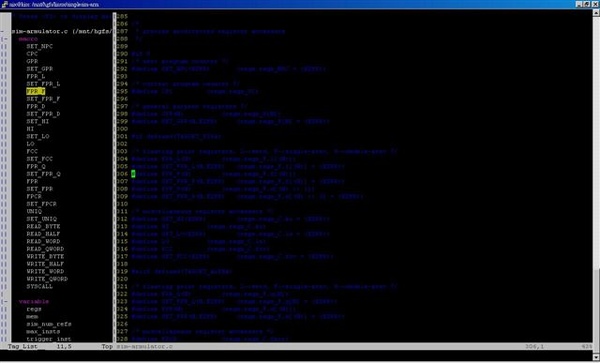
TagList也是很好用vim的plugin,功能太多啦,有點懶,就是寫些最基本的介紹了。
TagList的網頁是:
http://vim-taglist.sourceforge.net/
nix 發表在 痞客邦 留言(0) 人氣(8,352)
SED is a stream editor. A stream editor is used to perform basic text transformations on an input stream (a file or input from a pipeline).
nix 發表在 痞客邦 留言(0) 人氣(415)
General Syntax of awk: awk -f {awk program file} filename
nix 發表在 痞客邦 留言(0) 人氣(729)

大部分的純文字編輯器都有多視窗編輯的功能,非常的方便,其實vim也有,在www.vim.org可以找到這個好用的plugin,完整的網址如下:
http://www.vim.org/scripts/script.php?script_id=1338
使用起來也很方便,把下載的tabbar.vim放在Linux環境下的$HOME/.vim/plugin或Windows環境下的C:\Program Files\Vim\vimfiles\plugin就可以啦。
在同時開啓編輯多個檔案時,就會在編輯的上方多出一個TabBar的區域,顯示目前開啓的全部檔案和檔案編號,要切換不同的檔案就用<Alt>+<檔案編號>就可以了,如果是用gvim的話還可以用<Ctrl>+<Tab>或<Ctrl>+<Shift>+<Tab>切換到下一個或前一個檔案。真是個方便的功能呀
nix 發表在 痞客邦 留言(0) 人氣(1,622)
/dev/null - Use to send unwanted output of program
Syntax: command > /dev/null
$ls > /dev/nullNormally all our variables are local. Local variable can be used in same shell, if you load another copy of shell (by typing the /bin/bash at the $ prompt) then new shell ignored all old shell's variable.Conditional executioncommand1 && command2, command2 is executed if, and only if, command1 returns an exit status of zero.
command1 || command2, command2 is executed if and only if command1 returns a non-zero exit status.
Ex: $ rm myfile && echo "File is removed successfully" || echo "File is not removed"By default in Linux every program has three files (stdin, stdout, stderr) associated with it, (when we start our program these three files are automatically opened by your shell).Redirect the output from a file descriptor directly to file with following syntax
Syntax: file_descriptor_number>filename
Ex: $rm bad_file 2> errlogRedirect one standard io to another standard io.
Syntax: form>&destination /* use & get the address of destination */
Ex: 1>&2, directs the standard output (stdout) to standard error (stderr) device.
Ex:
#!/bin/sh
if [ $# -ne 2 ]
then
echo "Error : Number are not supplied" 1>&2 /* print error message on stderr and not on stdout */
echo "Usage : $0 number1 number2" 1>&2
exit 1
fi
ans=`expr $1 + $2`
echo "Sum is $ans"Function is series of instruction/commands.
Syntax:
function_name ()
{
command1
command2
…
commandN
return
}
Ex: Type SayHello() at $prompt
$SayHello()
>{
>echo “Hello $LOGNAME, have a nice day”
>}
$SayHello /* execute SayHello() function in the command line */
Ex: Show a message when logout the shell, edit .bash_logout
$vi ~/.bash_logout
SayBuy()
{
echo “Buy $LOGNAME! Life never be the same, until you login again!”
echo “Press a key to logout…”
read
return
}User interface
Ex:
# Script to create simple menus and take action according to that selected menu item
while :
do
clear
echo "-------------------------------------"
echo " Main Menu "
echo "-------------------------------------"
echo "[1] Show Today’s date/time"
echo "[2] Show files in current directory"
echo "[3] Show calendar"
echo "[4] Start editor to write letters"
echo "[5] Exit/Stop"
echo "======================="
echo -n "Enter your menu choice [1-5]: "
read yourch
case $yourch in
1) echo "Today is `date` , press a key. . ." ; read ;;
2) echo "Files in `pwd`" ; ls -l ; echo "Press a key. . ." ;read ;;
3) cal ; echo "Press a key. . ." ; read ;;
4) vi ;;
5) exit 0;;
*) echo "Oops!!! Please select choice 1,2,3,4, or 5";
echo "Press a key. . ." ; read ;;
esac
donedialog utility /* apt-get install dialog */
Syntax:
dialog --title {title} --backtitle {backtitle} {Box options}
where Box options can be any one of following--yesno {text} {height} {width}--msgbox {text} {height} {width}--infobox {text} {height} {width}--inputbox {text} {height} {width} [{init}]--textbox {file} {height} {width}--menu {text} {height} {width} {menu} {height} {tag1} item1}...Ex:dialog \--backtitle "Linux Shell Script" \--title "Alert: Delete File" \--yesno "\nDo you want to delete '~/hello' file" 7 60sel=$? /* the answer is exit status */case $sel in 0) echo "User select to delete file";; /* press yes button */ 1) echo "User select not to delete file";; /* press no button */ 255) echo "Canceled by user by pressing [ESC] key";; /* press Escape key, cancel dialog box */esacEx:dialog \
--backtitle "Linux Shell Script" \
--title "Inputbox - To take input from you" \
--inputbox "Enter your name please" 8 60 2> /tmp/input.$$
sel=$?na=`cat /tmp/input.$$`case $sel in 0) echo "Hello $na";; 1) echo "Cancel is pressed";; 255) echo "[ESCAPE] key pressed";;esacrm -f /tmp/input.$$Ex:dialog \--backtitle "Linux Shell Script" \--title "Main Menu" \--menu "Move using [UP] [DOWN] [ENTER] to Select" 15 50 3 \ /* 15/50: height/width of box, 3: height of menu */ Date/time "Shows Date and Time" \ /* tag item */ Calendar "To see calendar" \ Editor "To start vi editor" 2>/tmp/menuitem.$$ /* send selected tag to temporary file */menuitem=`cat /tmp/menuitem.$$`opt=$?case $menuitem in Date/time) date;; Calendar) cal;; Editor) vi;;esactrap commandSyntax: trap {commands} {signal number list} | Signal number | When occurs |
| 0 | Shell exit |
| 1 | Hangup |
| 2 | Interrupt (CTRL+C) |
| 3 | Quit |
| 9 | Kill (cannot be caught) |
Ex:# Signal is trapped to delete temporary filedel_file(){ echo "*** CTRL + C trap occurs (removing temporary file) ***" rm -f /tmp/input0.$$ exit 1}Take_input1(){ recno=0 clear echo "Appointment Note keeper Application for Linux" echo -n "Enter your database file name: " read filename if [ ! -f $filename ]; then echo "Sorry, $filename does not exit, creating $filename database" echo "Appointment Note keeper Application database file" > $filename fi echo "Data entry start data: `date`" > /tmp/input0.$$ # Set a infinite loop while : do echo -n "Appointment Title:" read na echo -n "Time:" read ti echo -n "Any remark:" read remark echo -n "Is data okay (y/n)?" read ans if [ $ans = y -o $ans = Y ]; then recno=`expr $recno + 1` echo "$recno. $na $ti $remark" >> /tmp/input0.$$ fi echo -n "Add next appointment (y/n)?" read isnext if [ $isnext = n -o $isnext = N ]; then cat /tmp/input0.$$ >> $filename rm -f /tmp/input0.$$ return # terminate loop fi done}
# Set trap for CTRL+C interrupt i.e. Install our error handler, when occurs it first calls del_file() and then exittrap del_file 2 /* trap CTRL+C signal and do the corresponding action */# Call our user define function: Take_input1Take_input1The shift command moves the current values stored in the positional parameters (command line args) to the left one position.Syntax: shift {offset}Ex:#!/bin/sh# convert a decimal number (-n) to another number with specified basesystem (-b)# usage: convert –b base –n numberwhile [ "$1" ]do if [ "$1" = "-b" ]; then
ob="$2" case $ob in 16) basesystem="Hex";; 8) basesystem="Oct";; 2) basesystem="bin";; *) basesystem="Unknown";; esac shift 2 elif [ "$1" = "-n" ]; then num="$2" shift 2 else echo "Program $0 does not recognize option $1" exit 1 fi
doneoutput=`echo "obase=$ob; ibase=10; $num;" | bc`echo "$num Decimal number = $output in $basesystem number system(base=$ob)"getopts commandSyntax: getopts {optstring} {variable}Ex:#!/bin/sh# Usage: ani -n -a -s -w -d# help_ani() To print helphelp_ani(){ echo "Usage: $0 -n -a -s -w -d" echo "Options: These are optional argument" echo " -n name of animal" echo " -a age of animal" echo " -s sex of animal " echo " -w weight of animal" echo " -d demo values (if any of the above options are used their values are not taken)" exit 1}#Start main procedure#Set default value for variableisdef=0na=Snoopyage="2 Months"sex=Maleweight=3Kg#if no argumentif [ $# -lt 1 ]; then help_anifiwhile getopts n:a:s:w:d optdo case "$opt" in n) na="$OPTARG";; a) age="$OPTARG";; s) sex="$OPTARG";; w) weight="$OPTARG";; d) isdef=1;; \?) help_ani;; esacdoneif [ $isdef -eq 0 ]; then echo "Animal Name: $na, Age: $age, Sex: $sex, Weight: $weight (user define mode)"else na="Pluto Dog" age=3 sex=Male weight=20kg echo "Animal Name: $na, Age: $age, Sex: $sex, Weight: $weight (demo mode)"fi nix 發表在 痞客邦 留言(2) 人氣(6,500)
if condition
Syntax:
if condition
then
command1 if condition is true or if exit status of condition is 0 (zero)
…
…
fi
Ex:
#!/bin/sh
# Script to test rm command and exist status
if rm $1
then
echo "$1 file deleted"
fiCondition is nothing but comparison between two values. For compression you can use test or [ expr ] statements or even exist status can be also used.test command or [ expr ], test command or [ expr ] is used to see if an expression is true, and if it is true it return zero(0), otherwise returns nonzero for false.
Syntax: test expression OR [ expression ]
Ex:
#!/bin/sh
# Script to see whether argument is positive
if test $1 -gt 0 /* Or, if [ $1 –gt 0 ] */
then
echo "$1 number is positive"
fitest or [ expr ] works with- Integer ( Number without decimal point)
- File types
- Character strings
Operators in shell script nix 發表在 痞客邦 留言(0) 人氣(2,114)
Shell Script is series of command written in plain text file.To find all available shells in your system type following command:
$cat /etc/shellsTo find your current shell type following command
$ echo $SHELLExample:
$vi first.sh
#!/bin/sh
# Comment
clearecho “Knowledge is Power”
$chmod 755 first.sh
$./first.shRAM memory is divided into small locations, and each location had unique number called memory location/address, which is used to hold our data. Programmer can give a unique name to this memory location/address called memory variable or variable.Show system variables:
$setDefine a user defined variable:
variable_name=value;Rules for naming variable name:- Variable name must begin with Alphanumeric character or underscore character (_), followed by one or more Alphanumeric character.
- Don't put spaces on either side of the equal sign when assigning value to variable.
- Variables are case-sensitive.
- You can define NULL variable as follows (NULL variable is variable which has no value at the time of definition)
$ vech=
$ vech="" - Do not use ?,* etc, to name variable names.
Use echo command to display text or value of variable. Display text or variables value on screen.Syntax: echo [options] [string, variables...]
Options:
| -n | Do not output the trailing new line. |
| -e | Enable interpretation of the following backslash escaped characters in the strings: \a: alert (bell) \b: backspace \c: suppress trailing new line \n: new line \r: carriage return \t: horizontal tab \\: backslash |
ex: $ echo -e "An apple a day keeps away \a\t\tdoctor\n"Arithmetic operations
Syntax: op1 math-operator op2
ex.: $ echo `expr 10 \* 3` /* expr expression is enclosed by `(back quote)signs, \ is the escape character */Three types of quotes:
| “ | Double Quotes | "Double Quotes" - Anything enclose in double quotes removed meaning of that characters (except \ and $). |
| ‘ | Single quotes | 'Single quotes' - Enclosed in single quotes remains unchanged. |
| ` | Back quote | `Back quote` - To execute command |
The value of exit status is zero/nonzero means the results of executing shell command(s) is successful/not successful. Use $? get the value of exit status.Use read to get input (data from user) from keyboard and store (data) to variable.
Syntax: read variable1, variable2,...variableN
#!/bin/bash# Script to read your name from keyboard
echo "Your first name please:"
read fname
echo "Hello $fname, Lets be friend!"Run more commands on one command line
Syntax: command1; command2Shell built in variables:
| $? | Exit status. |
| $# | Number of command line arguments. Useful to test no. of command line args in shell script. |
| $*, $@ | All arguments to shell. |
| $- | Option supplied to shell. |
| $$ | PID of shell. |
| $! | PID of last started background process (started with &). |
| $i | i-th command line argument. Ex: $myshell foo bar, $0 is myshell, $1 is foo, $2 is bar. |
You can't assign the new value to command line arguments.Redirection of standard output/input- > redirector symbol
Syntax: Linux-command > filename, to output Linux-commands result (output of command or shell script) to file. - >> redirector symbol
Syntax: Linux-command >> filename, to output Linux-commands result (output of command or shell script) to END of file. - < redirector symbol
Syntax: Linux-command < filename, to take input to Linux-command from file instead of key-board.
A pipe is a way to connect the output of one program to the input of another program without any temporary file.A pipe is nothing but a temporary storage place where the output of one command is stored and then passed as the input for second command. Pipes are used to run more than two commands ( Multiple commands) from same command line.
Syntax: command1 | command2If a Linux command accepts its input from the standard input and produces its output on standard output is known as a filter.
Ex: $sort < sname | uniq > u_name, uniq is filter which takes its input from sort command and passes this lines as input to uniq.A process is program (command given by user) to perform specific Job. In Linux when you start process, it gives a number to process (called PID or process-id), PID starts from 0 to 65535.An instance of running command is called process and the number printed by shell is called process-id (PID), this PID can be used to refer specific running process.Commonly used commands with process:
| For this purpose | Use this command | Example |
| To stop processes by name i.e. to kill process | killall {Process-name} | $ killall httpd |
| To stop all process except your shell | kill 0 | $kill 0 |
| To display a tree of processes | pstree | $pstree |
nix 發表在 痞客邦 留言(0) 人氣(1,468)

這次是在Ubuntu 7.04的環境Compile 2.6.22.9的Kernel。在Ubuntu的環境下Compile Linux kernel是件輕鬆的事,要做的事很少喔。
在Compile kernel前要先確定的就是有個gcc可以用啦,如果不確定就用apt-get build-dep gcc再安裝一次gcc吧,安裝完隨便寫個Hello Wrold測試一下就行啦。
先確認一下/bin/sh是link到/bin/bash,Ubuntu預設是link到/bin/dash,還是用bash比較習慣。
nix 發表在 痞客邦 留言(7) 人氣(35,457)
